How to Search and Export Google Workspace Email Without Google Takeout
Short answer: On Google Workspace Business Starter or Standard there is no Vault, and Google Takeout cannot filter by keyword. To find every email that mentions a word or phrase across all employees, a super admin authorizes a read-only service account, and a script searches each mailbox through the Gmail API and saves every match as an original .eml file with a CSV manifest. Setup takes about 15 minutes.
When an attorney asks for “every email that mentions X, from everyone, for all time,” most small businesses on Google Workspace hit a wall. Vault, the built-in eDiscovery tool, only comes with Business Plus and higher. Takeout and the admin Data Export tool export everything, with no keyword filter.
The way around it is the Gmail API with a service account. It uses the same search syntax as the Gmail search box, it works on every Workspace plan, and it produces the original messages plus a spreadsheet listing each one with a SHA-256 fingerprint. We ran exactly this for a client in litigation this week: seven mailboxes and 341 matching emails in about four minutes, with no license upgrade. Here is every step.
Why not use Google Takeout, Data Export or Vault?
Takeout and Data Export copy whole mailboxes with no keyword filter, and Vault filters by keyword but only on Business Plus and higher. On Business Starter or Standard, the Gmail API is the only built-in route to a keyword-filtered export that does not mean exporting everything and digging through it by hand.
| Option | Plans | Keyword search | All users at once | Output |
|---|---|---|---|---|
| Google Takeout | All | No (whole mailbox or labels) | No, each user runs their own | .mbox per user |
| Admin Data Export tool | All Workspace | No | Yes, all org data | Everything, to Cloud Storage |
| Google Vault | Business Plus, Enterprise, Education | Yes | Yes | .mbox or PST plus metadata, with holds and an audit trail |
| Gmail API + service account | All, including Starter and Standard | Yes, full Gmail search syntax | Yes | .eml per message plus CSV manifest |
If the export is for active litigation and you need a legal hold, the cleanest route can be to upgrade to Business Plus for one month, use Vault, then downgrade. For most attorney review requests, the API approach below is faster and costs nothing extra.
What do you need before you start?
- A super admin account in the Google Workspace tenant.
- A Windows, Mac or Linux computer with Python 3.10 or newer to run the search.
- Written authorization from the business owner or counsel to search employee mailboxes.
The access is read-only. The script can read mail and list users. It cannot send, change or delete anything.
How do you set up access?
You create a service account in Google Cloud, download its JSON key, and authorize it in the Workspace Admin console to read mail across the domain. Do every step signed in as a super admin. It takes about 15 minutes.
Step 1: Create a Google Cloud project
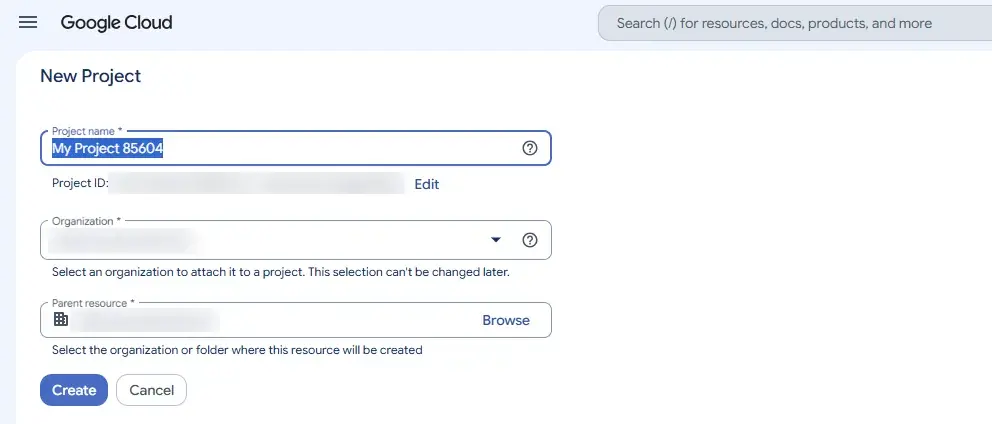
Go to console.cloud.google.com, click the project picker at the top left, then New project. Name it something like mail-export, set Organization to your domain, and click Create. Then select the new project in the project picker.
Step 2: Enable the Gmail API and Admin SDK API
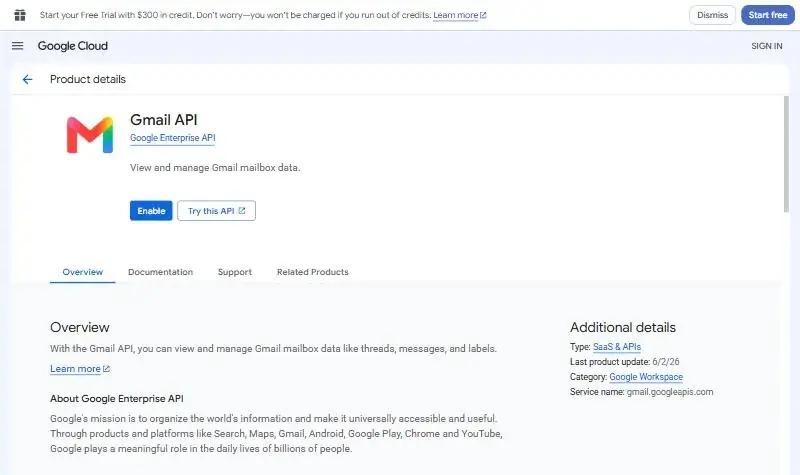
Open APIs & Services, then Library. Search for Gmail API and click Enable. Do the same for Admin SDK API, which lets the script list every user in the domain.
Step 3: Create the service account
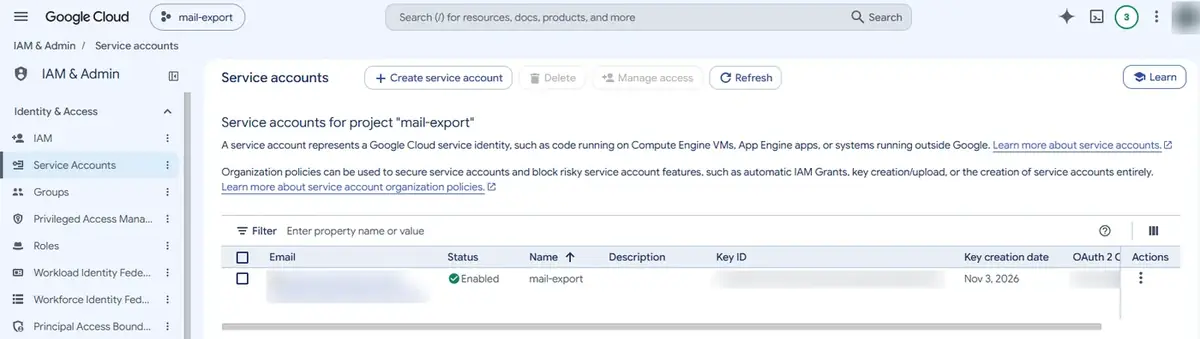
Open IAM & Admin, then Service Accounts, then Create service account. Name it mail-export, click Create and continue, skip the optional permissions, and click Done. Click the new account and copy its Unique ID (about 21 digits) from the Details tab.
Step 4: Download the JSON key
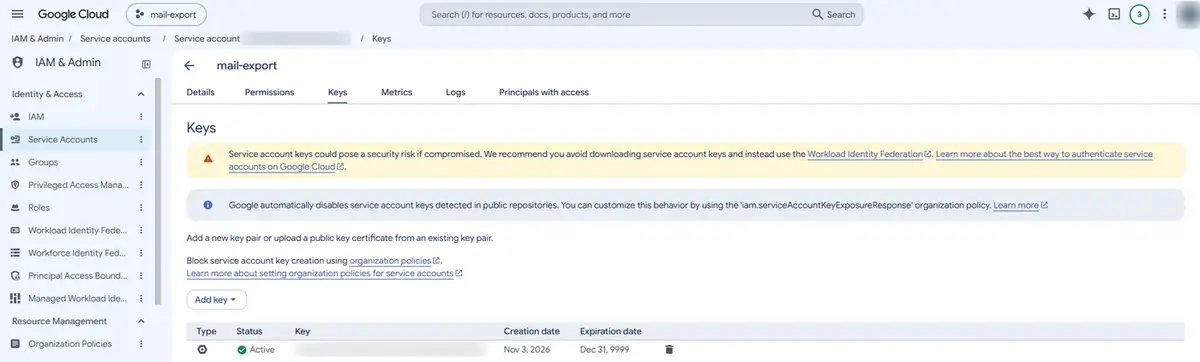
On the service account, open the Keys tab, choose Add key, then Create new key, then JSON, and click Create. The file downloads once and cannot be downloaded again. Treat it like a password: anyone holding it can read every mailbox.
If you see “Service account key creation is disabled”: Google turns this policy on by default for organizations created after May 2024. Grant yourself Organization Policy Administrator at the organization level, then on the project go to IAM & Admin, Organization Policies, find Disable service account key creation, override the parent’s policy with enforcement Off, and try again.
Step 5: Authorize domain-wide delegation
In admin.google.com, go to Security, Access and data control, API controls, Manage Domain Wide Delegation, then Add new. Paste the Unique ID from Step 3 and these two read-only scopes, then click Authorize. It usually takes effect within a few minutes.
https://www.googleapis.com/auth/gmail.readonly,https://www.googleapis.com/auth/admin.directory.user.readonly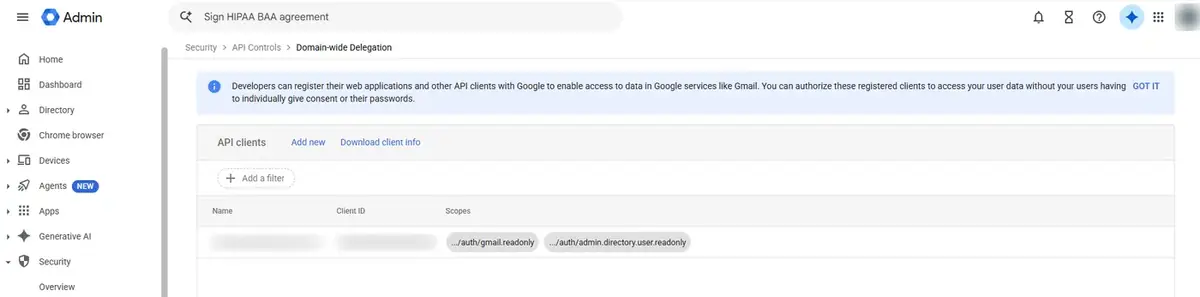
How do you run the search and export?
The script below impersonates one employee at a time through the service account, runs a Gmail search with Trash and Spam included, and saves each match byte for byte. Run it once for each employee address; Directory, Users in the Admin console lists them all. Do a count-only pass first so you and the attorney can confirm the numbers before anything is downloaded.
Install the two Google libraries:
pip install google-api-python-client google-authThis is the core of it. The search query is exactly what you would type in the Gmail search box:
from google.oauth2 import service_account
from googleapiclient.discovery import build
import base64

KEY = "key.json"
QUERY = '"project name" OR projectname'

def gmail_for(user):
    creds = service_account.Credentials.from_service_account_file(
        KEY, scopes=["https://www.googleapis.com/auth/gmail.readonly"], subject=user)
    return build("gmail", "v1", credentials=creds)

def export(user):
    gmail, token = gmail_for(user), None
    while True:
        page = gmail.users().messages().list(userId="me", q=QUERY, includeSpamTrash=True,
                                             maxResults=500, pageToken=token).execute()
        for m in page.get("messages", []):
            raw = gmail.users().messages().get(userId="me", id=m["id"], format="raw").execute()["raw"]
            with open(f"{user}_{m['id']}.eml", "wb") as f:
                f.write(base64.urlsafe_b64decode(raw))
        token = page.get("nextPageToken")
        if not token:
            break
For the count-only pass, comment out the two lines that open and write the file, and add up len(page.get("messages", [])) for each page instead. When the counts look right, put the lines back and run it again for each employee. Finish with a manifest: a spreadsheet listing each file’s employee, date, sender, subject and SHA-256 hash.
What does the attorney receive?
When we run this for a client, the attorney gets one folder per employee with the original .eml files, plus a manifest spreadsheet listing every message. The .eml format opens in Outlook, Apple Mail and Thunderbird and loads into every major review platform.
| File | What it contains |
|---|---|
| mail/<employee>/*.eml | Each matching email exactly as Gmail stores it, with attachments |
| manifest.csv | Custodian, date, from, to, cc, bcc, subject, Message-ID, Gmail labels, attachment names, size, SHA-256, file path |
| run_log.json | The exact search query, start and finish times, match and export counts per user, any errors |
| export.log | The full console log of the run |
Before handing it over, zip the folder and record the zip’s SHA-256 (Get-FileHash on Windows, shasum -a 256 on Mac). Send that value with the zip so the recipient can confirm the file arrived unchanged. The Message-ID column lets reviewers remove duplicates: when two employees exchange an email, each has a copy.
What did this look like for a real client?
A commercial client on Business Starter was going through litigation and needed every email that mentioned two project names, from all employees for all time. Vault would have meant upgrading every license, so we ran the audit through the Gmail API instead. Setup on the client’s side took one afternoon, and the searches ran from our office the same day.
“Our client was on Google Workspace Business Starter and didn’t want to upgrade their licensing just to get Vault for one legal matter. Using the Gmail API, we ran the email audit across every mailbox ourselves and gave their attorneys a verified export to support the litigation they were going through, without changing a single license.”
Joe Engelking, Owner, The Computer Guyz
| Search 1 | Search 2 | |
|---|---|---|
| Mailboxes searched | 7 | 7 |
| Matching emails | 341 | 3,170 |
| Unique emails (after removing copies) | 268 | 2,338 |
| Date span | 2021 to 2026 | 2019 to 2026 |
| Export time | 3.5 minutes | 35 minutes |
| Size (unzipped / zipped) | 245 MB / 162 MB | 4.9 GB / 3.3 GB |
| Errors | 0 | 0 |
After each export, every file was re-hashed against the manifest before zipping, with zero mismatches. The alternative would have been a Takeout from all seven employees and a manual search through several gigabytes of mbox files.
What can’t this method do?
The Gmail API only sees mail that still exists. Anything a user deleted and then emptied from Trash is gone, and on Business Starter and Standard there is no Vault retention to bring it back.
- Deleted user accounts. Export a departing employee’s mail before deleting the account.
- Google Groups archives, Chat and Drive files. These need separate tools.
- Partial words. A search for
invoicewill not findinvoices123. Add each spelling, including run-together versions likeprojectname, which also catch email addresses and domains. - Legal holds and an eDiscovery audit trail. If opposing counsel may challenge collection, ask the attorney whether a Vault export is required.
How do you remove the access afterwards?
As soon as the export is delivered, remove the access. Until you do, the JSON key can read every mailbox.
- Admin console: delete the domain-wide delegation entry.
- Google Cloud: shut down the
mail-exportproject (IAM & Admin, Settings, Shut down). This also deletes the key. - Delete every copy of the JSON file from your computer and any shared drive.
Frequently Asked Questions
Do I need Google Vault to search all employee email?
No. Vault is the built-in tool, but it only comes with Business Plus and higher plans. On Business Starter or Standard, a super admin can authorize a read-only service account, and a script can then search every mailbox through the Gmail API using normal Gmail search syntax.
Can Google Takeout search for keywords?
No. Takeout exports a whole mailbox, or selected labels, as an mbox file. It has no keyword or date filter, and each user runs it for their own account, so you would have to export everything first and search the files yourself.
Does this find deleted emails?
It finds emails in Trash and Spam. It does not find emails that were permanently deleted. Without Vault retention, permanently deleted Gmail on Business Starter and Standard cannot be recovered through any admin tool.
Is a Gmail API export acceptable for legal review?
For attorney review it usually is: you get original messages, a SHA-256 hash for each file and a log of the exact query. For litigation where collection methods may be challenged, ask counsel first, because Vault adds legal holds and an audit trail.
How long does a Gmail API email export take?
Setup takes about 15 minutes for the super admin. The search itself runs at roughly 100 emails a minute. Our 341-message export took 3.5 minutes, and a 3,170-message export took 35 minutes across seven mailboxes.
Need an Email Export Done for You?
If you would rather not touch service accounts, we can run the search and export for you and hand your attorney a verified package. Call (843) 884-1323, contact us or get an instant quote.
Ready for a straight answer? Start with a free IT assessment. No pressure, no obligation.
Or call (843) 884-1323.